> For the complete documentation index, see [llms.txt](https://docs.jentis.com/llms.txt). Markdown versions of documentation pages are available by appending `.md` to page URLs; this page is available as [Markdown](https://docs.jentis.com/data-capture/web-tracking-setup/set-up-jentis-data-layer/e-commerce-tracking.md).
# E-Commerce Tracking
## E-Commerce Tracking with JENTIS
When commercial products or promotional content are involved, there are specific properties and interactions that must be tracked to enable meaningful e-commerce insights. The JENTIS Data Capture Platform (DCP) provides a robust and flexible way to track product, cart, checkout, and promotional activity.
This section provides an overview of the foundational concepts, followed by individual articles for each type of e-commerce interaction.
### Product Type – Key to Success
Each product in the JENTIS Data Layer must have a defined `type`, which indicates the context of the product interaction.
#### Supported Product Types:
* `categoryview`
* `productview`
* `addtocart`
* `removefromcart`
* `cartview`
* `checkout`
* `order`
* `productlist`
* `productlistclick`
* `search`
Products must be tracked with the `track: "product"` command and always include the `type` property.
You can also track **promotions** separately. These are elements such as banners, creatives, or call-to-actions that influence user behavior.
### Dependencies and Consistency
All tracking commands must be called in the correct sequence so they are captured within the same interaction context. This ensures the data is grouped into a single state when `track: "submit"` is called.
#### Example: Order and Product List on Same Page
```javascript
_jts.push({
track: "product",
type: "order",
id: "12345567",
name: "Baby Oil"
});
_jts.push({
track: "order",
id: "order_1"
});
_jts.push({
track: "product",
type: "productlist",
id: "7890",
name: "Baby Shoes"
});
_jts.push({
track: "productlist",
listname: "suggested-products"
});
_jts.push({
track: "submit"
});
```
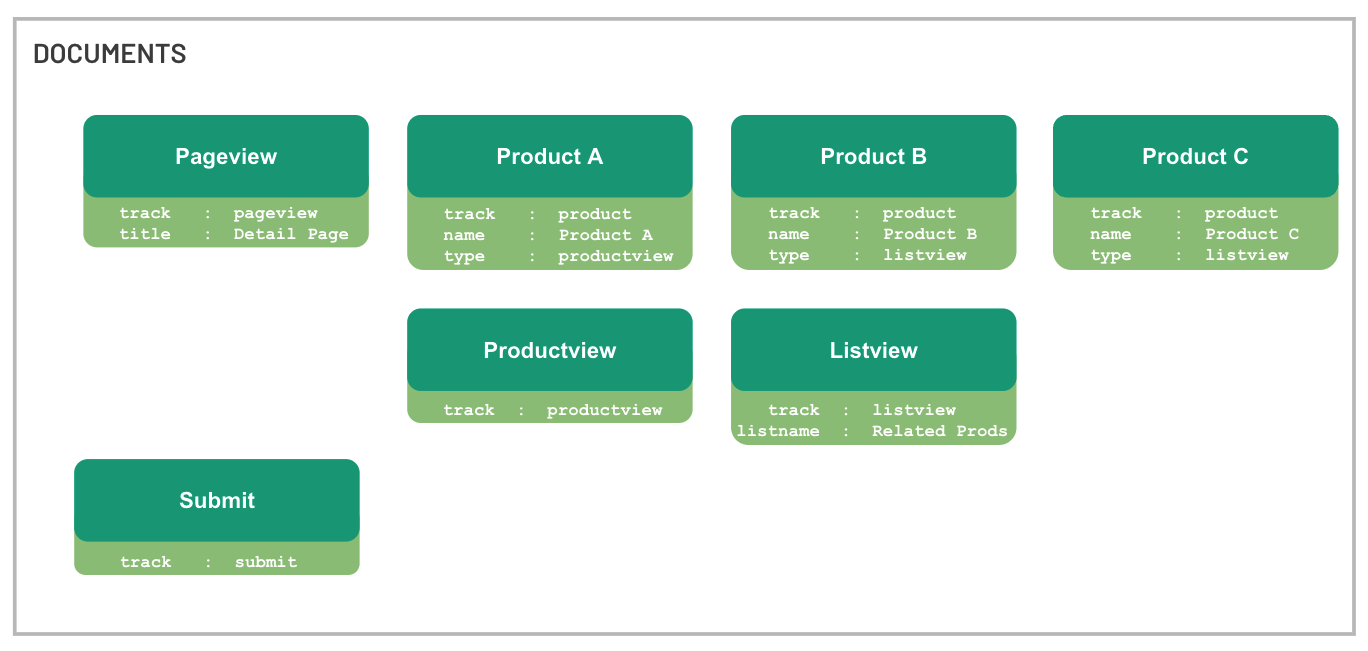
### Visual Structure
In a typical setup, multiple products can be associated with different types, such as `productview` or `listview`. These types are resolved into a unified state using the `submit` command.
Example:
* `Product A`: type `productview` → tracked with `track: "productview"`
* `Product B` & `C`: type `listview` → tracked with `track: "productlist"` and a `listname`
All data is packaged together at the end with `track: "submit"`.
### Product Object Schema
JENTIS supports standard product properties, and you can extend this object with custom fields. For custom data usage, see [Custom Data Layer Definitions](/developer-guide/data-layer/jentis-data-layer/custom-data-layer-definitions.md).
#### Tracking Command: `product`
| Name | Description | Type | Mandatory | Example |
| ----------- | -------------------------------------------------------- | ------- | --------- | --------------------- |
| `id` | Unique product ID | string | yes | `"ab12"` |
| `type` | Type of ecommerce interaction (e.g. `order`, `cartview`) | string | yes | `"currentcart"` |
| `name` | Product name | string | no | `"Baby Oil"` |
| `group` | ERP product groups | array | no | `["Small Sortiment"]` |
| `brutto` | Price incl. VAT | decimal | no | `14.90` |
| `netto` | Price excl. VAT | decimal | no | `12.42` |
| `oldbrutto` | Original price incl. VAT | decimal | no | `18.90` |
| `oldnetto` | Original price excl. VAT | decimal | no | `16.90` |
| `brand` | Product brand | string | no | `"Milka"` |
| `quantity` | Quantity of product | int | no | `3` |
| `position` | Position in list | int | no | `4` |
#### Product Push Example
```javascript
_jts.push({
track: "product",
type: "order",
id: "12345567",
name: "Baby Oil",
group: ["Small Sortiment", "Baby"],
brutto: 123.90,
netto: 110.90,
oldbrutto: 150.00,
oldnetto: 140.00,
brand: "Milka",
quantity: 3,
position: 2
});
```
### Product Type Schemas and Interactions
Each product interaction type (e.g., `productview`, `addtocart`, `checkout`) has its own tracking schema.
> Explore the following individual articles for detailed documentation:
* [Product List Tracking](/data-capture/web-tracking-setup/set-up-jentis-data-layer/e-commerce-tracking/product-list-tracking.md)
* [Product View Tracking](/data-capture/web-tracking-setup/set-up-jentis-data-layer/e-commerce-tracking/product-view-tracking.md)
* [Add to Cart Tracking](/data-capture/web-tracking-setup/set-up-jentis-data-layer/e-commerce-tracking/add-to-cart-tracking.md)
* [Remove from Cart Tracking](/data-capture/web-tracking-setup/set-up-jentis-data-layer/e-commerce-tracking/remove-from-cart-tracking.md)
* [Cart View Tracking](/data-capture/web-tracking-setup/set-up-jentis-data-layer/e-commerce-tracking/cart-view-tracking.md)
* [Checkout Tracking](/data-capture/web-tracking-setup/set-up-jentis-data-layer/e-commerce-tracking/checkout-tracking.md)
* [Order Tracking](/data-capture/web-tracking-setup/set-up-jentis-data-layer/e-commerce-tracking/order-tracking.md)
* [Promotion Tracking](/data-capture/web-tracking-setup/set-up-jentis-data-layer/e-commerce-tracking/promotion-tracking.md)
---
# Agent Instructions
This documentation is published with GitBook. GitBook is the documentation platform designed so that both humans and AI agents can read, navigate, and reason over technical content effectively. Learn more at gitbook.com.
## Querying This Documentation
If you need additional information that is not directly available in this page, you can query the documentation by asking a question.
Perform an HTTP GET request on the following URL with the `ask` and `goal` query parameters:
```
GET https://docs.jentis.com/data-capture/web-tracking-setup/set-up-jentis-data-layer/e-commerce-tracking.md?ask=&goal=
```
`ask` is the immediate question: it should be specific, self-contained, and written in natural language.
`goal` is what the user is ultimately trying to achieve, the reason they need the answer. Sharing it helps GitBook give you a better, more relevant answer. A goal is most helpful when it describes the outcome the user wants rather than restating the question. For example, with `ask=how do I create an API token`, a goal like `automate deployments from our CI pipeline` lets GitBook tailor the answer to that use case.
The response will contain a direct answer to the question and relevant excerpts and sources from the documentation.
Use this mechanism when the answer is not explicitly present in the current page, you need clarification or additional context, or you want to retrieve related documentation sections.