> For the complete documentation index, see [llms.txt](https://docs.jentis.com/llms.txt). Markdown versions of documentation pages are available by appending `.md` to page URLs; this page is available as [Markdown](https://docs.jentis.com/developer-guide/troubleshooting-and-common-errors/click-tracking-not-executed/click-tracking-not-executed-further-troubleshooting.md).
# Click Tracking not executed - Further Troubleshooting
### Click Tracking not executed
On navigational clicks (like a button to submit a form, which forwards the user to the next page displaying a "message received" page), there are race conditions involved. It is not guaranteed that the click-event signal will be sent before the page unloads to make room for the next page to be displayed in the browser.
With this very tricky situation, the JENTIS Data Capturing platform provides some methods to mitigate the impact of lost data. There are some topics that we must quickly cover before discussing solutions.
With each JENTIS state there is a grace period by default. This timeframe of 2000ms (2 seconds) will give async variables and promises to be resolved before the actual JENTIS State is computed and data transmitted from client to the JENTIS server.
This feature is meant to provide the opportunity to use async variable computation with JENTIS. On the other hand, the conflict with the click navigation arises because there is not enough time to await this grace period for this event.
To mitigate this impact, you can make sure that no variable in your setup returns explicitly "undefined" or is async. If no such variable is referenced, the grace period will not be triggered, and hence, all data will be sent immediately.
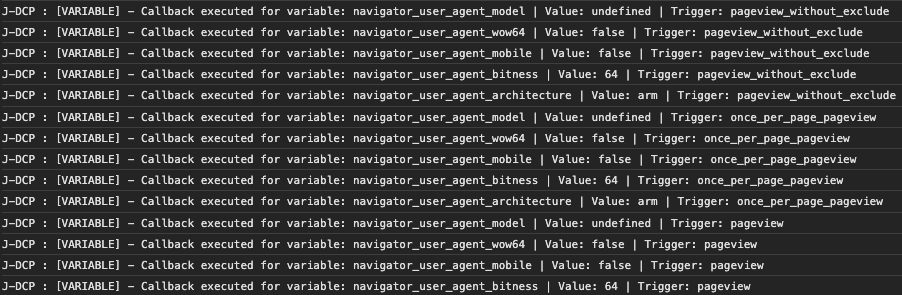
Identifying such variables can be a bit tricky. However, when in preview and with the developer toolbox open in the console JENTIS will report async-variables:
In the console log you will find the messages of "\[VARIABLE] - Callback executed for variable" that indicate this situation described above.
You'd need either not to use those variables in the event of the click (meaning: it is not referenced in a tag or trigger) or if they are not async, not return "undefined" but a value instead (maybe "" - empty string). This will ensure that the grace period is circumvented.
In general, we recommend using the `sendBeacon` transmission method as described in the state documentation. This method sends requests to JENTIS using the `sendBeacon` API instead of `XMLHttpRequest`, which can help prevent issues on pages that switch quickly.
### Further Troubleshooting
Another common issue with click and other action tracking (via JENTIS trigger "SELECTORACTION", see details here: [Event & Interaction Tracking](https://docs.jentis.com/documentation/event-and-interaction-tracking)) is when the CSS selector seems not to get to work. Whenever you preview your click-interaction in the console and preview nothing pops up. Just like JENTIS is ignoring the click. Why is that?
HTML and DOM can be a grueling topic, and web applications sometimes interfere with each other or run into conflicts. This is sometimes the case when listening to click (and other) events propagated in the DOM of a page. Generally, the click-trigger in JENTIS will use the Event Bubbling principle to listen for relevant events (find a good introduction to this topic here: ). However, when another web app stops the bubbling the event propagation (via stopPropagation() function call) no information will arrive at the body of the website. And JENTIS will never receive any information of a click.
Unfortunately, this situation is very tricky to further investigate or help with, as it always depends on individual implementations and website frameworks used. Hence, we can not provide any further tips to mitigate such conflicts.
However, you can approach your website frontend developers and check with them if any element in their app will stop the event propagation. If so, you have found the root cause and can possibly solve it there.
You can observe the situation on your site with the following two tests.
If the click listener is implemented on the document level:
{% code lineNumbers="true" %}
```javascript
document.addEventListener('click', function(event) {
// This function will check if the event target or any of its parents
// match the given selector.
function matchSelector(target, selector) {
// Loop through the parent nodes until the document is reached.
while (target && target !== document) {
// Check if the current target matches the selector.
if (target.matches(selector)) {
return target;
}
// Move up in the DOM tree.
target = target.parentNode;
}
return null;
}
// The selector for your specific element
var selector = 'a[href*="Rent-a-Truck"]';
// Check if the clicked element or any of its parents match the selector.
var match = matchSelector(event.target, selector);
if (match) {
// Call your function here.
console.log('Link with "Rent-a-Truck" in href clicked.');
// You can replace this log with your function to be executed.
}
});
```
{% endcode %}
This will not execute the console log message.
However, the same CSS selector when appended to the specific node will execute:
{% code lineNumbers="true" %}
```javascript
document.querySelectorAll('a[href*="Rent-a-Truck"]')[0].
addEventListener("click", x=>{
console.log('Link with "Rent-a-Truck" in href clicked.');
});
```
{% endcode %}
Unfortunately, there is no option on our end to change the situation.
You can do the following:
* make sure the website is not breaking the event propagation as mentioned in the articles above
* OR implement the click-tracking in a custom code in JENTIS (with appending the click event listener to the node directly and submit a \_jts.push() with an event to activate tracking with your tag manager) as a workaround
---
# Agent Instructions
This documentation is published with GitBook. GitBook is the documentation platform designed so that both humans and AI agents can read, navigate, and reason over technical content effectively. Learn more at gitbook.com.
## Querying This Documentation
If you need additional information that is not directly available in this page, you can query the documentation by asking a question.
Perform an HTTP GET request on the following URL with the `ask` and `goal` query parameters:
```
GET https://docs.jentis.com/developer-guide/troubleshooting-and-common-errors/click-tracking-not-executed/click-tracking-not-executed-further-troubleshooting.md?ask=&goal=
```
`ask` is the immediate question: it should be specific, self-contained, and written in natural language.
`goal` is what the user is ultimately trying to achieve, the reason they need the answer. Sharing it helps GitBook give you a better, more relevant answer. A goal is most helpful when it describes the outcome the user wants rather than restating the question. For example, with `ask=how do I create an API token`, a goal like `automate deployments from our CI pipeline` lets GitBook tailor the answer to that use case.
The response will contain a direct answer to the question and relevant excerpts and sources from the documentation.
Use this mechanism when the answer is not explicitly present in the current page, you need clarification or additional context, or you want to retrieve related documentation sections.