> For the complete documentation index, see [llms.txt](https://docs.jentis.com/llms.txt). Markdown versions of documentation pages are available by appending `.md` to page URLs; this page is available as [Markdown](https://docs.jentis.com/jentis-dcp-elements/variables/server-side-variables-backend.md).
# Server-Side Variables (Backend)
The server side has the capability to calculate and return values as you need them, just like the Frontend Variables. The difference is the runtime, as all the Backend Variables are calculated on the server and thus don’t access the actual environment on a user's browser. Instead, the Backend Variables access values that are submitted in the JENTIS Data Model (Document Objects). Here you can create functions to address complex logic that you need to apply to values to meet certain syntax criteria or serve a business case.
## Server-Side Variable Basics
Other than client-side variables, the server-side counterpart has the unique possibility of "Variable Evaluation". The value of a server-side function may be used in multiple triggers or tags. However, each server-side variable will be evaluated once per State. If a server-side Variable is neither referenced in any element (tag, trigger) in a State, it will not be evaluated.
## Server-Side Variable Creation Process
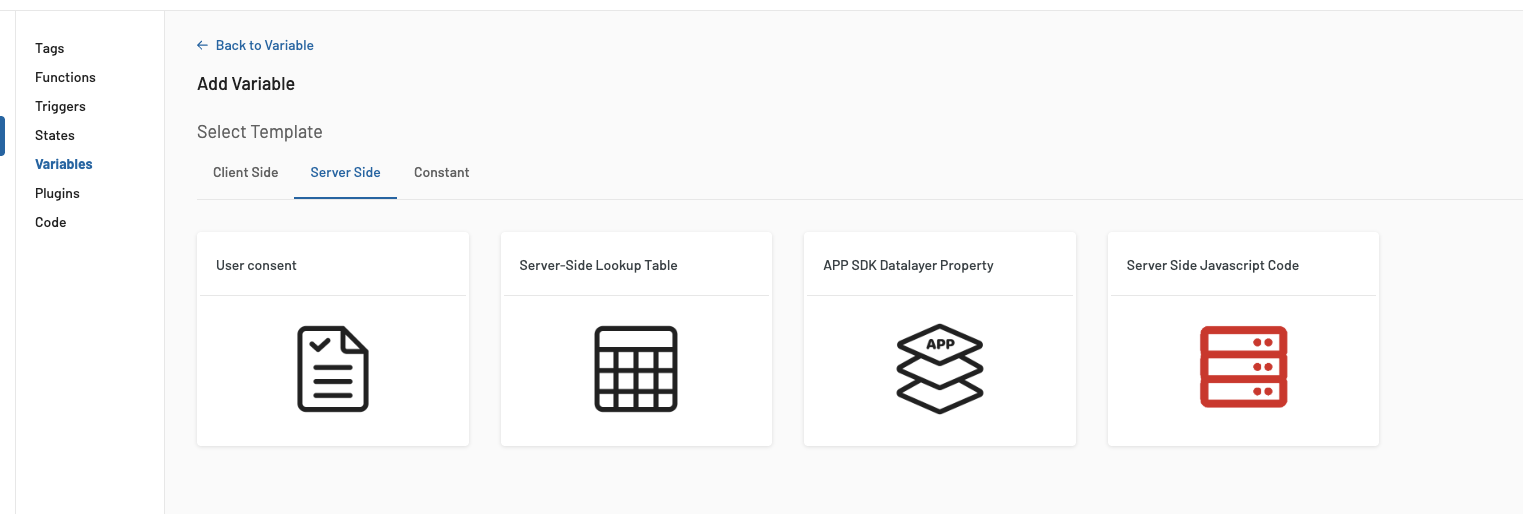
To create a server-side variable, navigate your DCP to Server Tag Manager: Variables and select “Server Side”. Here you can add new server-side variables or adjust existing ones.
There are several templates available for creating a server-side variable
| Template Name | Use Case | Description |
| --------------------------- | -------- | ----------- |
| User consent | | |
| Server-Side Lookup Table | | |
| APP SDK Datalayer Property | | |
| Server-Side JavaScript Code | | |
---
# Agent Instructions
This documentation is published with GitBook. GitBook is the documentation platform designed so that both humans and AI agents can read, navigate, and reason over technical content effectively. Learn more at gitbook.com.
## Querying This Documentation
If you need additional information that is not directly available in this page, you can query the documentation by asking a question.
Perform an HTTP GET request on the following URL with the `ask` and `goal` query parameters:
```
GET https://docs.jentis.com/jentis-dcp-elements/variables/server-side-variables-backend.md?ask=&goal=
```
`ask` is the immediate question: it should be specific, self-contained, and written in natural language.
`goal` is what the user is ultimately trying to achieve, the reason they need the answer. Sharing it helps GitBook give you a better, more relevant answer. A goal is most helpful when it describes the outcome the user wants rather than restating the question. For example, with `ask=how do I create an API token`, a goal like `automate deployments from our CI pipeline` lets GitBook tailor the answer to that use case.
The response will contain a direct answer to the question and relevant excerpts and sources from the documentation.
Use this mechanism when the answer is not explicitly present in the current page, you need clarification or additional context, or you want to retrieve related documentation sections.