> For the complete documentation index, see [llms.txt](https://docs.jentis.com/llms.txt). Markdown versions of documentation pages are available by appending `.md` to page URLs; this page is available as [Markdown](https://docs.jentis.com/jentis-dcp-elements/variables/client-side-variables-frontend/use-cases-for-client-side-variables.md).
# Use Cases for Client-Side Variables
Client-side variables in JENTIS let you access front-end information for tracking. This includes clicked elements, HTML attributes, and `dataLayer` values. The examples below cover common use cases.
### JENTIS Data Layer Variable
Use this variable type to read a value pushed through the `_jts.push` API to the [JENTIS Data Layer](/developer-guide/data-layer/jentis-data-layer.md).
Following the JENTIS data model, you read a property from a specific document object.
{% code title="Example" lineNumbers="true" %}
```json
_jts.push({
"track" : "product",
"name" : "product A",
"my_prop" : 42
});
_jts.push({
"track" : "product",
"name" : "product B",
"my_prop" : 0
});
```
{% endcode %}
To read the value of `my_prop` in this example, use this configuration:
* **Property key:** “my\_prop”
* **Document name:** “product”
* **Merge option:** first / last
To clarify the difference between “First Occurrence” and “Last (Latest) Occurrence” (for Merge option) this example uses the same document, “product”, twice. If you select “first” the variable returns the first matching value, which is `42`. If you select “last” it returns the most recent matching value, which is `0`.
### GTM Data Layer Parameter
The global `dataLayer` is a common object used on many websites. You can read values from it with the “GTM Data Layer Value” client-side variable type.
{% code title="Example" lineNumbers="true" %}
```json
dataLayer.push({
"event" : "a",
"my_prop" : 42
})
dataLayer.push({
"event" : "b",
"my_prop" : 0
});
```
{% endcode %}
To read the value of `my_prop` in this example, use this configuration:
* **Parameter name:** “my\_prop”
Optional parameters:
* **Data layer name:** By default, this is `dataLayer`, but you can change it if your site uses a different object on `window`.
* **Event name:** This field is empty by default, but you can set it to a specific event value, such as `gtm.init`, to return a value only from matching `dataLayer` entries.
* **Occurrence pointer:** Choose whether to return the first or last occurrence of the parameter when multiple values with the same key exist. In the example above, “first” returns `42` and “last” returns `0`. The order depends on the sequence of items pushed into `dataLayer`. You can also read the value from a specific event based on the current [JENTIS State](/core-concepts/jentis-states-framework.md) context. For a full walkthrough, see [Custom Data Layer Definitions](/developer-guide/data-layer/jentis-data-layer/custom-data-layer-definitions.md).
### Custom JavaScript Function Variable
Use this variable type to define a custom JavaScript function that runs in the front end and returns a value.
Make sure to always use the following syntax:
{% code lineNumbers="true" %}
```js
function(){
return "hello world!";
}
```
{% endcode %}
Do not use HTML or plain text in this field. Only JavaScript code is allowed.
### Client-side to client-side variable references
This feature lets you access the value of another client-side variable within a client-side variable. This makes it easy to reuse existing values. You can also chain references across multiple variables.
Use the reference like this:
{% code lineNumbers="true" %}
```js
this.getFrontendVariable("");
```
{% endcode %}
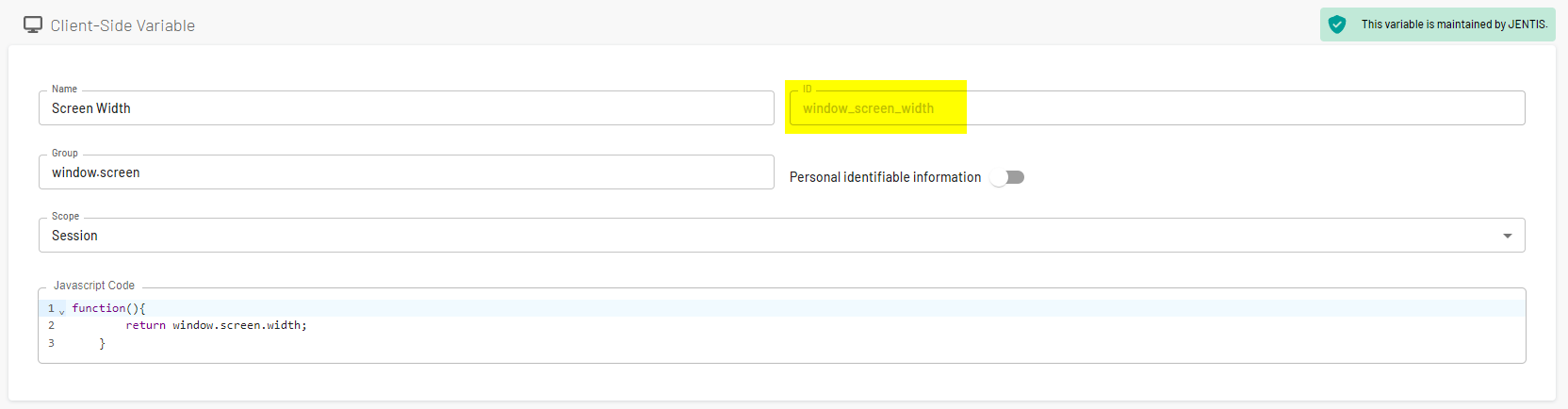
You can find a variable ID in the JTM edit view in the property field “ID”.
{% hint style="info" %}
It is important to note that this functionality works only with the JENTIS wrapper scripts we provide.
{% endhint %}
Full client-side variable example for collecting the screen resolution:
{% code lineNumbers="true" %}
```javascript
async function() {
return this.getFrontendVariable("window_screen_width") + " x " + this.getFrontendVariable("window_screen_height");
}
```
{% endcode %}
---
# Agent Instructions
This documentation is published with GitBook. GitBook is the documentation platform designed so that both humans and AI agents can read, navigate, and reason over technical content effectively. Learn more at gitbook.com.
## Querying This Documentation
If you need additional information that is not directly available in this page, you can query the documentation dynamically by asking a question.
Perform an HTTP GET request on the current page URL with the `ask` query parameter, and the optional `goal` query parameter:
```
GET https://docs.jentis.com/jentis-dcp-elements/variables/client-side-variables-frontend/use-cases-for-client-side-variables.md?ask=&goal=
```
`ask` is the immediate question: it should be specific, self-contained, and written in natural language.
`goal` is optional and describes the broader end goal you are ultimately trying to accomplish on behalf of the user. GitBook uses it to tailor the answer towards what is most useful for that goal.
The response will contain a direct answer to the question and relevant excerpts and sources from the documentation.
Use this mechanism when the answer is not explicitly present in the current page, you need clarification or additional context, or you want to retrieve related documentation sections.