> For the complete documentation index, see [llms.txt](https://docs.jentis.com/llms.txt). Markdown versions of documentation pages are available by appending `.md` to page URLs; this page is available as [Markdown](https://docs.jentis.com/jentis-dcp-elements/tools/advanced-settings/backend-data-storage.md).
# Backend Data Storage
Each configuration instance of a tool in your JENTIS account will function within its own scope. This means that data cannot be shared between different tools in JENTIS, ensuring enhanced privacy and data security. Whenever a value is saved on the JENTIS server for a tool, the action executed is saved only for that specific tool. For instance, if a tool saves a "Client ID" value to identify a website visitor, only that specific tool will have access to it. Even if two tool instances are of the same class, such as "Google Ads - EU" and "Google Ads - US", they cannot access each other's data.
With the feature to set custom Backend Data Storage options in a tool, you can now share data for the same tool classes. Here is how to configure this setting. Let's examine it in the example of Google Ads.
### **Activate Backend Data Storage - Background and Example**
Let's cover some background first. Google Ads requires a parameter value that must be stored from page entrance up to the event of conversion (which might be on a later page or session of a visitor). It's the "gclid" URL query parameter value that must be stored, and the best option is to use server-side storage, as it is the most secure and reliable option.
JENTIS, by default, will persist this information when a Google Ads tool instance is installed in your account with all tags automatically created (you must select this option when the tool is configured initially). Now, whenever a user enters the website and this tool is executed (based on the triggers and consent information), it will persist the "gclid" value on the server. For more information on which Google Ads tags to configure, please refer to the tools documentation: [Google Ads](/data-activation/connectors/google-ads.md)
In a manual configuration, you must activate the "Google Ads Campaign Detection" tag to persist any "gclid" parameter value received at the page entrance.
As soon as the conversion signal is received (again, based on the triggers and consent information), it will access the accordingly stored information to submit the value of the "gclid" parameter to Google Ads. This access refers to the backend storage that holds the information. Generally this is on a per-tool-instance basis, as mentioned before, each tool must persist its own data.
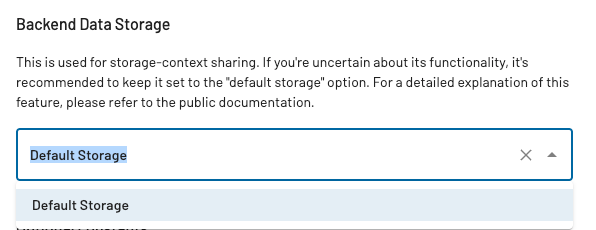
Here comes the option to share data between tool instances. You can adjust the "Default Storage" setting to select another tool of the same class. If you do so, both tools will share the same storage.
There will be a hint if data is shared in the menu item.
In the Google Ads example, if multiple instances of this tool are installed in your account and you select this option, the "gclid" value will be available to all tool instances. So, a conversion tracked in any of the tools will access the "gclid" value from any other tool, possibly enhancing your data quality as fewer restrictions on sharing data now apply.
This option is generally a good idea when multiple containers are used or when multiple instances of the same tool are configured. Please also make sure to check our guide [Sharing information - Cross-Domain Tracking](/use-cases-and-tutorials/sharing-information-cross-domain-tracking.md), which is often related. Data sharing might possibly also be technically restricted based on different website domains.
Further, for custom implementations and code, you must be aware that this setting (Backend Data Storage) on a tool affects the associated functions "storage.write" and "storage.read". For more details, see: [Server-Side Storage Interface](/developer-guide/server-side-storage-interface.md)
---
# Agent Instructions
This documentation is published with GitBook. GitBook is the documentation platform designed so that both humans and AI agents can read, navigate, and reason over technical content effectively. Learn more at gitbook.com.
## Querying This Documentation
If you need additional information that is not directly available in this page, you can query the documentation by asking a question.
Perform an HTTP GET request on the following URL with the `ask` and `goal` query parameters:
```
GET https://docs.jentis.com/jentis-dcp-elements/tools/advanced-settings/backend-data-storage.md?ask=&goal=
```
`ask` is the immediate question: it should be specific, self-contained, and written in natural language.
`goal` is what the user is ultimately trying to achieve, the reason they need the answer. Sharing it helps GitBook give you a better, more relevant answer. A goal is most helpful when it describes the outcome the user wants rather than restating the question. For example, with `ask=how do I create an API token`, a goal like `automate deployments from our CI pipeline` lets GitBook tailor the answer to that use case.
The response will contain a direct answer to the question and relevant excerpts and sources from the documentation.
Use this mechanism when the answer is not explicitly present in the current page, you need clarification or additional context, or you want to retrieve related documentation sections.