> For the complete documentation index, see [llms.txt](https://docs.jentis.com/llms.txt). Markdown versions of documentation pages are available by appending `.md` to page URLs; this page is available as [Markdown](https://docs.jentis.com/getting-started/quickstart/create-a-new-tool.md).
# Setup Your First Connector (GA4, Meta, etc.)
You can find the connectors section at the top of the main navigation in your JENTIS Data Capturing Platform account. This is where you can manage instances of different connectors and services, such as Facebook, Google Ads, Google Analytics, and others. These connectors can be configured multiple times, which is useful if you need to set up multiple data recipients (such as Pixel or Property IDs) with a single provider.
Instances of connector configurations have properties that can be accessed in all tags associated with them. These properties are used for global configuration values, such as a property or account ID. In the context of Google Analytics, the Measurement ID (GA4) or the Property ID (UA-ID for Universal Analytics) is an example of such values. Additionally, you can define additional custom parameters that are required as global constants for your configuration.
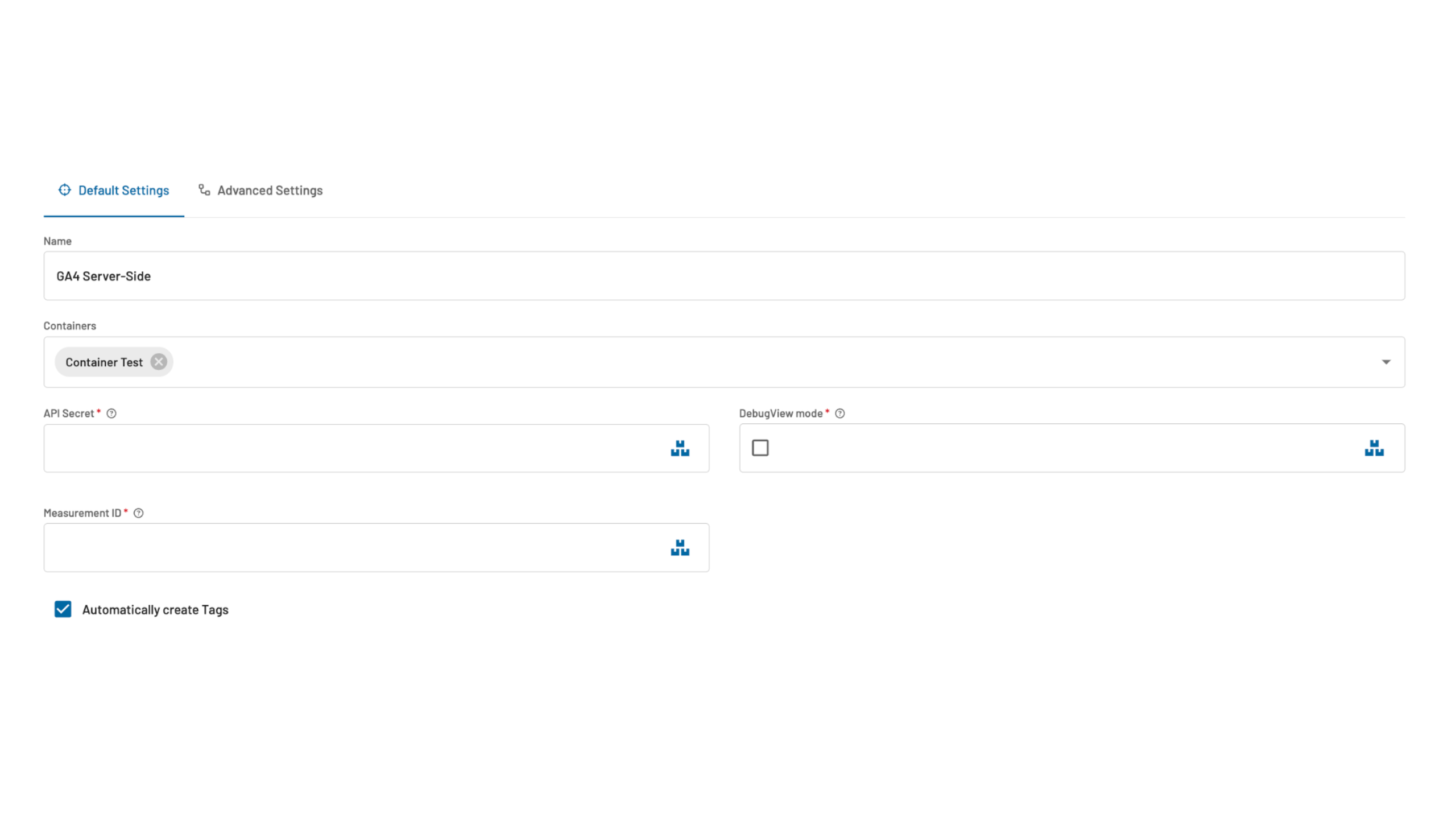
A connector configuration instance consists of the following settings:
* **Name**: Give your connector instance a human readable and meaningful name. We'd recommend to specify here a brief connector handle ("GA") and its purpose ("Web Analytics") and optionally the data target, if there are multiple instances ("UA-12345-0").
* **Containers**: This very important setting defines on what containers this connector configuration (with all associated Tags, Triggers and other elements) will be activated on a given JENTIS Tag Manager Container (ie. a given domain or website).
* **Constant Settings:** These are the global fields, that are shared across all tags of this connector instance. Those fields and values can hold different values for each environment (live, stage) and container (each to be defined in its column). This way you can create basic lookup tables for each individual container configuration. To set individual values in a field please click the "three boxes"-icon in the field input (at the most right of the input field).
## Connector Automatic Tag Creation
When a connector is created a toggle to "Automatically create Tags" is opted in. You can keep this enabled to generate all tags that are designed to work out of the box with the JENTIS Data Layer default.
It is recommended to keep this toggle if you intend to push data to the JENTIS Data Layer. If you primarily want to pull data based on your custom website and data layer design you can switch this toggle of, to not create tags that will not be triggered in that case anyway.
---
# Agent Instructions
This documentation is published with GitBook. GitBook is the documentation platform designed so that both humans and AI agents can read, navigate, and reason over technical content effectively. Learn more at gitbook.com.
## Querying This Documentation
If you need additional information that is not directly available in this page, you can query the documentation by asking a question.
Perform an HTTP GET request on the following URL with the `ask` and `goal` query parameters:
```
GET https://docs.jentis.com/getting-started/quickstart/create-a-new-tool.md?ask=&goal=
```
`ask` is the immediate question: it should be specific, self-contained, and written in natural language.
`goal` is what the user is ultimately trying to achieve, the reason they need the answer. Sharing it helps GitBook give you a better, more relevant answer. A goal is most helpful when it describes the outcome the user wants rather than restating the question. For example, with `ask=how do I create an API token`, a goal like `automate deployments from our CI pipeline` lets GitBook tailor the answer to that use case.
The response will contain a direct answer to the question and relevant excerpts and sources from the documentation.
Use this mechanism when the answer is not explicitly present in the current page, you need clarification or additional context, or you want to retrieve related documentation sections.