> For the complete documentation index, see [llms.txt](https://docs.jentis.com/llms.txt). Markdown versions of documentation pages are available by appending `.md` to page URLs; this page is available as [Markdown](https://docs.jentis.com/use-cases-and-tutorials/events-and-custom-states/listen-to-datalayer-events/connecting-to-your-websites-datalayer.md).
# Connecting to your Websites Datalayer
The first step is to get JENTIS to listen to the Datalayer on the website. We will create the integration in a way that will check all existing events in a `window.dataLayer` array and later react to all new pushes, as the website is loaded and users interact with it's triggering events.
The configuration needs some conceptual decision from you:
* Which events to listen to: all events, or just some specific event names?
* Are those event names case sensitive?
* What is the datalayers name?
This information should be quite easy to define. In our example, we will look for the “gtm.init” event, which is a case-sensitive definition. The datalayer is named `dataLayer` as in all default GTM installations.
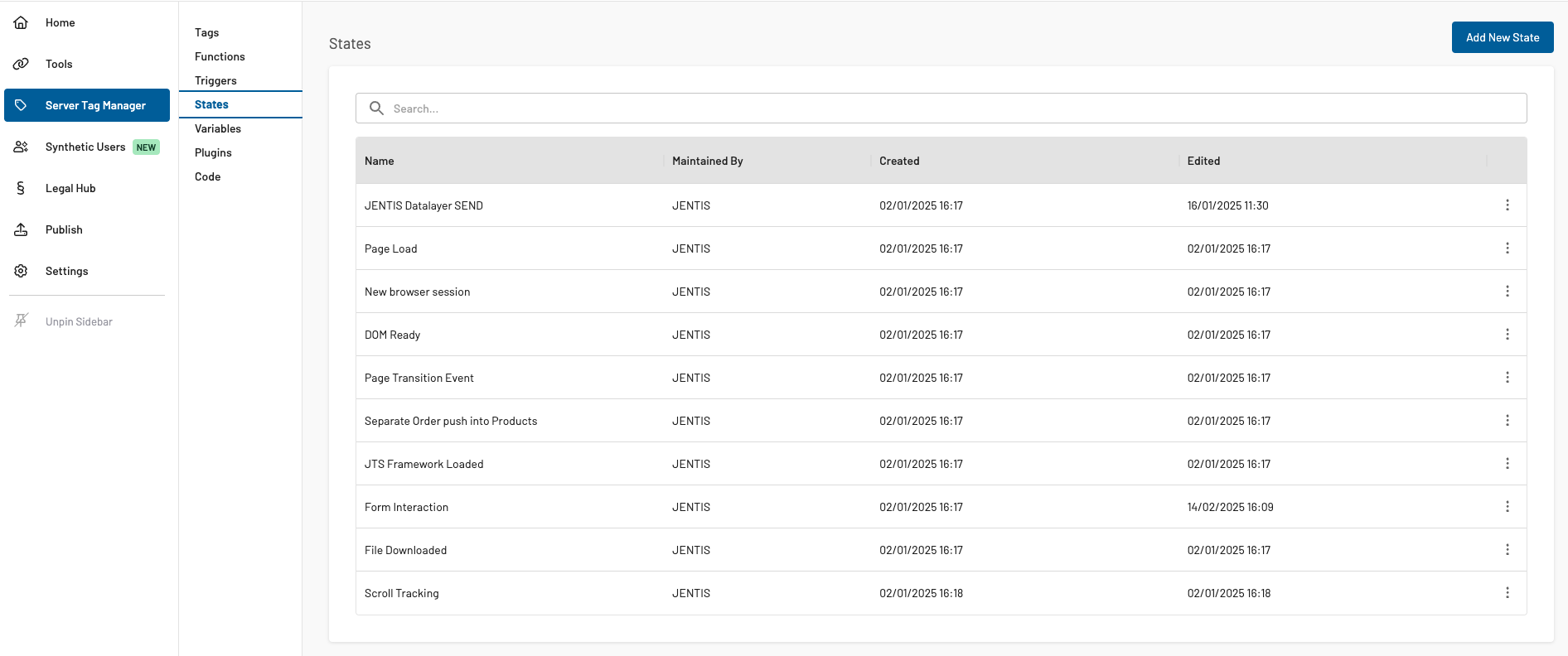
This is the code to be copy-pasted in a [JENTIS State](https://docs.jentis.com/documentation/jentis-states-framework). Navigate for this setup to the “States” in your DCP:
(navigate to "Server Tag Manager": States and click on the “Add New State”-Button)
Paste the following code into the “Javascript Code” input box:
{% code lineNumbers="true" %}
```javascript
function(initState){
//define events to listen to as single String values in array
//keep empty to listen to all events
var RELEVANT_EVENTS = ["gtm.init"];
var IGNORE_CASE = true;
var DATALAYER_NAME = "dataLayer";
var dl = window[DATALAYER_NAME] || [];
if(Array.isArray(dl) && dl.length && dl.length > 0) {
dl.forEach(arrayItem => {
initiateRelevantStates(arrayItem.event, arrayItem);
})
}
var originalPush = dl.push;
dl.push = function(args){
originalPush.call(window[DATALAYER_NAME], args);
initiateRelevantStates(args.event, args);
}
window[DATALAYER_NAME] = dl;
function initiateRelevantStates(event_name, event_object){
if(Array.isArray(RELEVANT_EVENTS) &&
RELEVANT_EVENTS.length > 0 &&
typeof event_name != "undefined"){
if(IGNORE_CASE){
event_name = event_name.toLowerCase();
for(i = 0; i < RELEVANT_EVENTS.length; i++)
RELEVANT_EVENTS[i] = RELEVANT_EVENTS[i].toLowerCase();
}
if(RELEVANT_EVENTS.includes(event_name)){
initState(event_object);
}
} else if(typeof event_name != "undefined")
initState(event_object);
}
}
```
{% endcode %}
Every time the website's application pushes a “gtm.init” event to the data layer, a JENTIS State is observed. Thus, all triggers connected to this state and their conditions are checked, which is exactly what should be configured next.
Please note that in the code, the initialization function call `initState()` a `event_object` Property is submitted, containing the datalayer's object that was pushed with it `{event:"gtm.init",property_key:"property_value"}`.
This gives consistent and reliable information on when this state was observed (regardless of whether this event will be observed when it is submitted via push function or if it was already in the data layer array before JENTIS was initialized on your website). As we will see in the next steps, this will become important.
---
# Agent Instructions
This documentation is published with GitBook. GitBook is the documentation platform designed so that both humans and AI agents can read, navigate, and reason over technical content effectively. Learn more at gitbook.com.
## Querying This Documentation
If you need additional information that is not directly available in this page, you can query the documentation by asking a question.
Perform an HTTP GET request on the following URL with the `ask` and `goal` query parameters:
```
GET https://docs.jentis.com/use-cases-and-tutorials/events-and-custom-states/listen-to-datalayer-events/connecting-to-your-websites-datalayer.md?ask=&goal=
```
`ask` is the immediate question: it should be specific, self-contained, and written in natural language.
`goal` is what the user is ultimately trying to achieve, the reason they need the answer. Sharing it helps GitBook give you a better, more relevant answer. A goal is most helpful when it describes the outcome the user wants rather than restating the question. For example, with `ask=how do I create an API token`, a goal like `automate deployments from our CI pipeline` lets GitBook tailor the answer to that use case.
The response will contain a direct answer to the question and relevant excerpts and sources from the documentation.
Use this mechanism when the answer is not explicitly present in the current page, you need clarification or additional context, or you want to retrieve related documentation sections.